

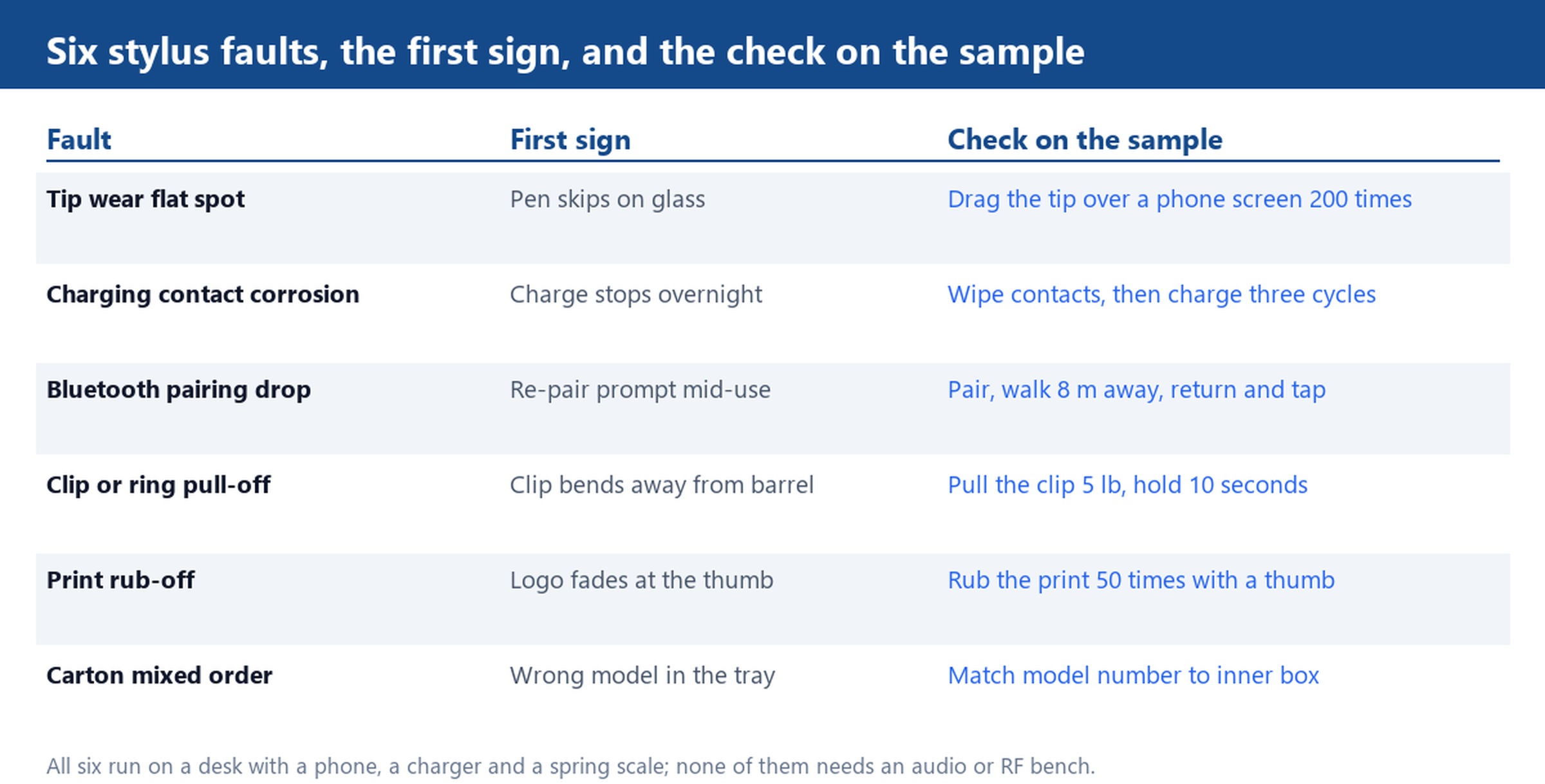
Stylus pen common defects concentrate in six places, and five of them are mechanical rather than electronic. That matters for anyone writing a purchase specification, because a sample that writes well for ten seconds says almost nothing: the tip flat spot appears after a few hundred strokes, the clip gives way after a season in a pocket, and the print fades where the thumb rests. Each fault has a visible first sign, and each check below runs on a desk with a phone, a charger and a spring scale.
Tip Wear: The Flat Spot That Drags on Glass
A capacitive tip is a soft dome, usually silicone or a conductive elastomer, and it wears where the user actually writes. The wear pattern is a flat spot on one side, and the flat spot is what makes the pen skip: contact area drops, the capacitance change the screen reads becomes marginal, and the stroke breaks up at the start of a line. On a sample this takes a few hundred strokes to show, so test it deliberately rather than trusting a quick signature.
Drag the tip across a phone screen two hundred times in the same direction, then write a line and inspect the dome against a light. A visibly flattened face means the compound is too soft for the way the pen will be used, and the fix is a harder tip rather than a different screen. Check the tip retention at the same time: pull the tip straight off with light finger pressure. A tip that comes away easily will be lost by the user within a month, and a replacement tip is often not in the carton.
Active and Bluetooth Pens: Charging Contacts, Pairing Drops and Storage Drain
An active pen adds three failure modes that a passive pen does not have. The first is the charging contact: two small pads on the barrel or under the clip, which collect skin oil and pocket lint and then stop conducting. Wipe the pads with a dry cloth, charge three full cycles, and watch whether the charge indicator reaches full each time. A pen that charges on the first cycle and refuses on the third has a contact geometry problem, not a cell problem.
The second is pairing stability. The bluetooth active build pairs with a phone or tablet, and the fault that shows up in the field is a re-pair prompt in the middle of use. Pair the sample, walk eight metres away until the link drops, come back and tap the screen. A pen that needs to be re-paired after that walk will do the same in a bag. The third is storage drain: leave the pen switched on and unused for a day, then check whether it still holds charge, because a pen that empties itself in a drawer is a support ticket with no visible cause.
Clip, Keychain Ring and the Body Dimensions That Decide Both
The clip is the most-loaded part of the whole product and the least specified. A clip that holds a shirt pocket sees a small force many times a day, so the test is a squeeze and a pull rather than a visual check: pull the clip away from the barrel with about five pounds of force, hold for ten seconds, release, and see whether it returns to its original angle. A clip that stays bent has a moulding that is too thin at the hinge, and it will also mark the barrel where it rubs.
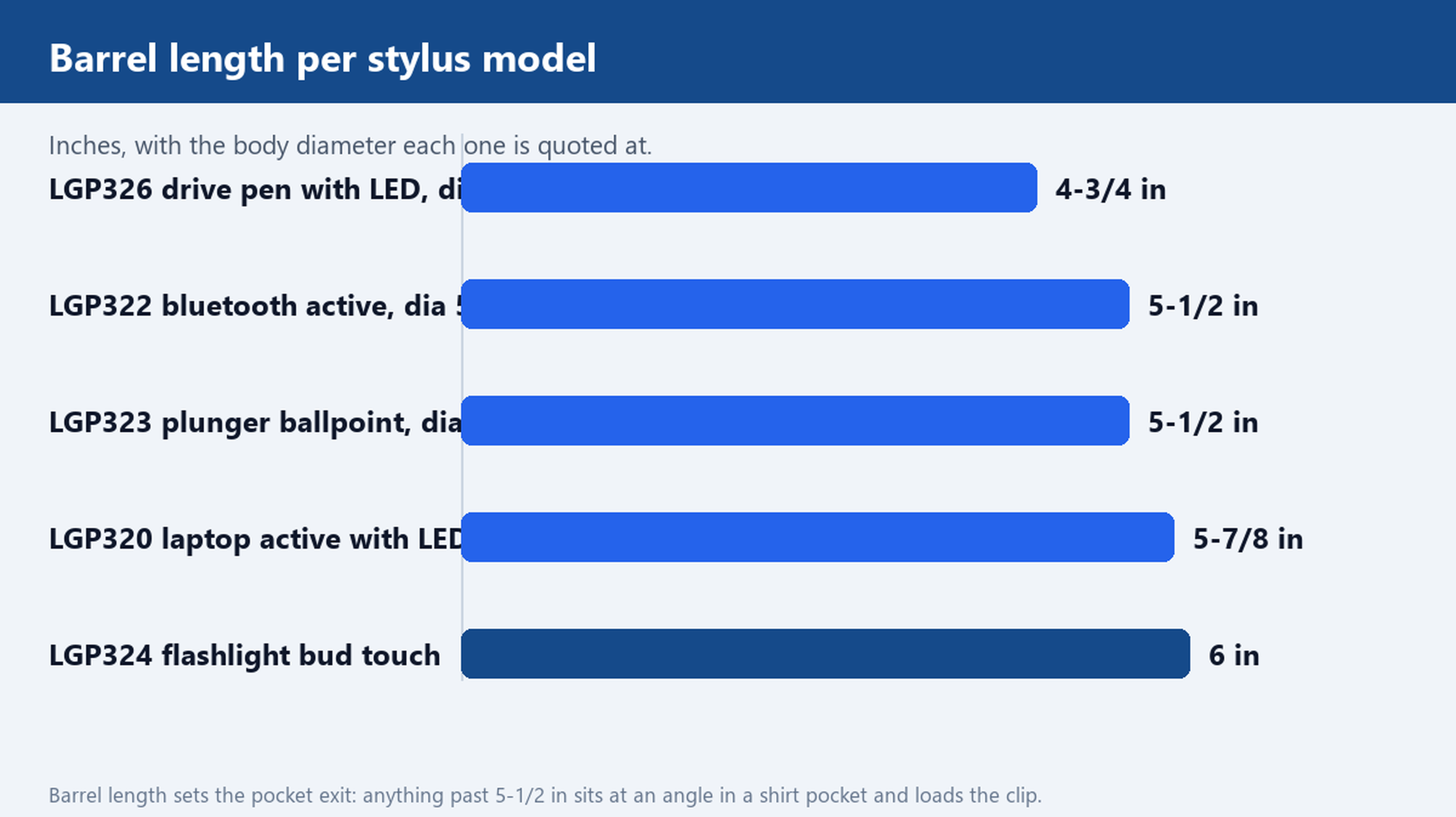
Body dimensions predict this. The barrel lengths in this range run from 4-3/4 in on the drive pen with LED light up to 6 in on the flashlight bud touch pen, with the plunger ballpoint and the bluetooth build both at 5-1/2 in. The long barrels sit at an angle in a shirt pocket and load the clip sideways, which is why the longest models benefit from a keychain ring instead: a ring takes the load in line with the barrel rather than across it.
Print Rub-Off on a Plastic Barrel After a Pocket Season
Logo application on these pens is quoted as silk screen or heat transfer printing, and the two behave differently under thumb wear. Silk screen sits on the surface as a thin film and abrades at the edges first; heat transfer fuses deeper and tends to fail as a whole patch rather than a fringe. Either way, the test is a rub: fifty strokes with a dry thumb over the print, then look for a change in edge sharpness against a sample that has not been rubbed.
Ask which process is being used for your artwork before the run, because a fine-detail logo with thin strokes and small text is a silk screen job, and a large solid block is faster by heat transfer. Then confirm the barrel diameter against the print area. The 1/2 in barrels in this range, on the laptop active pen and the plunger model, wrap a logo around a tighter curve than the 5/8 in bluetooth barrel, so artwork that reads well on one will look stretched on the other.
Carton and Mixed-Order Checks Before a Bulk Shipment
Mixed orders are where a clean production run still arrives wrong. When several pen models ship in one carton, the tray dividers are the one thing separating them and a single mis-loaded tray produces a support problem that looks like a product fault. Open the inner box, match the model number on the pen to the model number on the box, and count one tray per model rather than counting the carton total.
Then confirm the paperwork: the printed logo matches the approved artwork, the model and quantity on the inner box match the packing list, and the reference price band quoted for the model is the one on the invoice. A stylus pen range this wide is easy to mix, and the check that prevents it is the cheapest part of the whole order.
Send your pen type and artwork for a sample and a bulk price.