

A guest in a hotel room is not short of USB ports any more. The phone charger, the tablet and the laptop all bring their own bricks. What the room cannot supply is a stable link, and that is the reason to specify a network hub for hotel room desks rather than another multi-port charger: the gigabit port is the part of the product the guest cannot replicate from a bag.
Why a Hotel Desk Needs an Ethernet Port, Not Just More USB
WiFi in a hotel is shared. At eight in the evening the access points on a floor are carrying phones, tablets and televisions, and a video call from room 512 lands in the same queue as everything else. A wired port does not add bandwidth to the building, but it removes the contention between the guest and the corridor. For a business traveller on a call, that is the difference between a usable room and a complaint at check-out.
The practical argument for putting the port on the desk hub rather than in the wall is cable management. A wall socket behind the desk needs a cable long enough to reach a laptop, and that cable is then loose on the desk. A hub with the port on the guest side of the desk takes a short patch lead and keeps the connection where the guest can see it. The network hubs category covers both the compact desk units and the larger shells.
Port Count Against Body Size: 3, 6 and 13 Ports on the Same Desk
Port count is the specification buyers ask about first and the one that causes the most returns, because a hub with more ports is a bigger box. Desk depth in a hotel room is usually set by the furniture contract long before the IT specification is written, so the body size has to be chosen against the desk, not the other way round.
A useful split by room type:
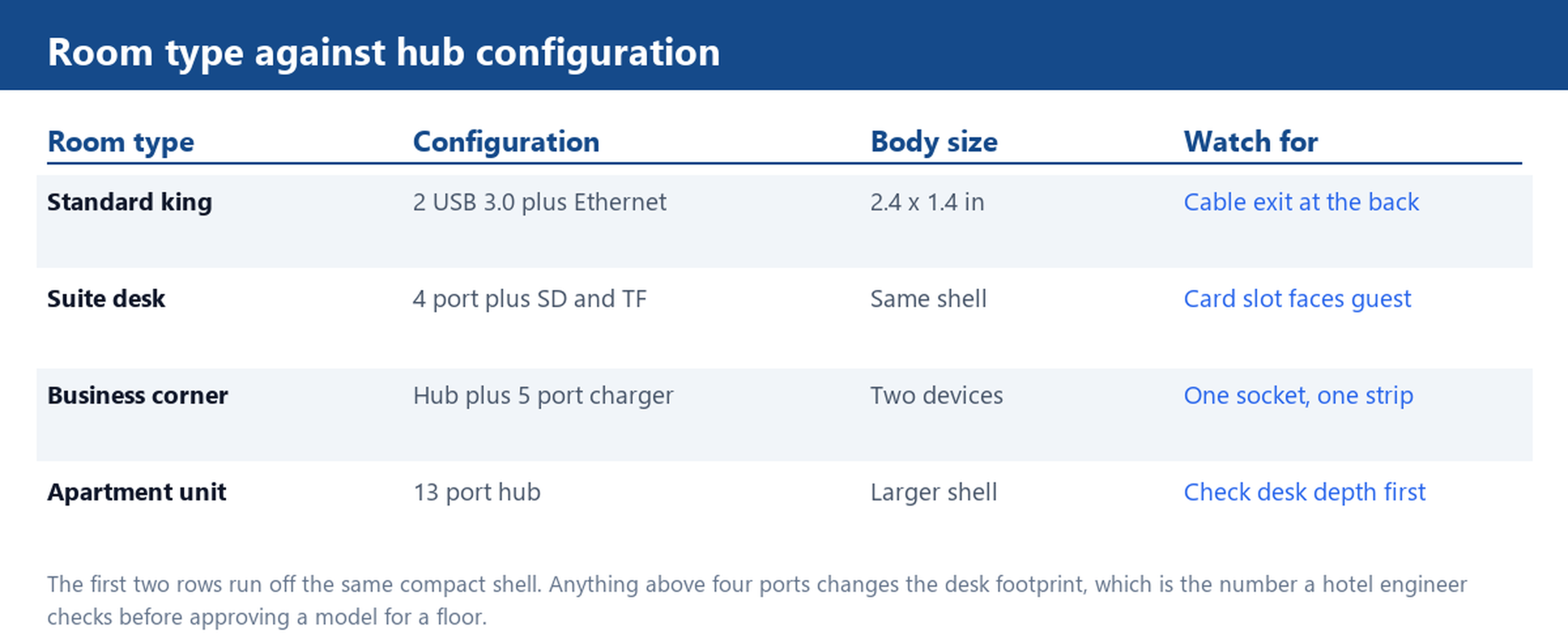
- Standard room. Two USB 3.0 ports plus the Ethernet port covers a phone and a laptop, and it fits a shell around 2.4 by 1.4 inches. This is the model to standardise on for a floor of identical rooms.
- Suite or workstation desk. Four ports plus SD and TF slots, so a guest can move photos off a camera without hunting for a reader. Same shell family, one step up in cost.
- Business corner or apartment. A larger shell with more ports, and here the desk drawing matters: a hub that overhangs the front edge of a narrow desk gets knocked off it.
One detail that decides whether the unit survives a year of guests: where the cable exits. A rear exit keeps the desk clear; a side exit catches on a chair arm. Ask for the cable exit position on the drawing before approving the model.
Gigabit Ethernet Inside the Hub and the Adapter That Feeds It
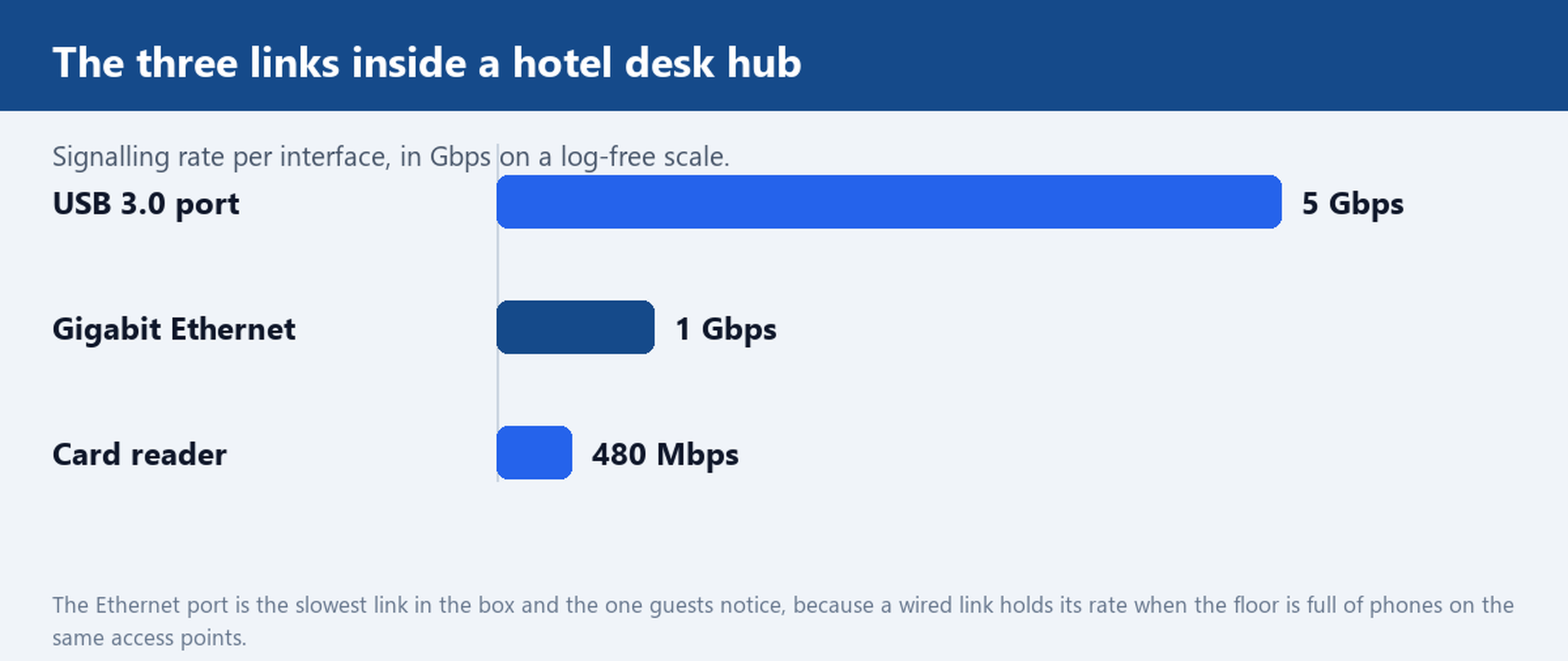
Inside the compact unit the interfaces run at very different rates: USB 3.0 at 5 Gbps, the Ethernet port at 1 Gbps, and a card reader in the hundreds of megabits. The Ethernet port is the slowest of the three and the one that matters, because a wired gigabit link holds its rate while the WiFi around it degrades.
What buyers should confirm on the sample is that the port is a real gigabit port and not a fast Ethernet port with a gigabit label. Two checks settle it without a tester: the port negotiates a gigabit link on a known gigabit switch, and a large file transfer holds a rate in the hundreds of megabits rather than capping near a hundred. The patch lead matters here as well: a long, thin one that came out of a drawer will negotiate down and make a good hub look faulty.
The adapter that feeds the hub is the other half of the specification. A bus-powered hub takes its current from the laptop, which is fine for a card reader and marginal for a phone charging at the same time. For a room where the hub also charges, specify a powered unit with its own supply and put the supply rating on the purchase order, not just the hub model.
2.4 A Charging, a 5 V 4 A Adapter and Guest-Proof Strain Relief
Charging is where the desk hub meets the guest directly. A five-port charger rated at 35 W works out to roughly 2.4 A per port if all five are loaded at once, which is enough for a phone and a tablet but not for a laptop. Splitting the functions is usually the better engineering: a hub for data and one charger for power, because a single box that tries to do both at laptop level is a bigger, hotter and more expensive unit on a small desk.
Strain relief is the unglamorous part of the specification that decides the failure rate. Guests pull cables sideways, not straight out. A moulded boot that is short and stiff transfers the load to the connector inside, and the port works loose. On a unit that will see hundreds of guests a year, specify a longer, softer boot and a port that sits slightly recessed in the shell, so the side load is taken by the housing rather than the solder joint.
Label the ports. A guest who cannot tell which port is the fast one will use whichever is nearest, and a printed label is cheaper than a support call to the front desk.
ABS or Aluminium, 12-Month Warranty and the Four-to-Five Week Window
The compact model here is built from ABS with an aluminium top plate, which is a sensible combination for a hotel desk: the plate resists scratches from keys and bags, and the ABS shell keeps the weight and the cost down. A full aluminium body is worth the step up where the unit is visible in a suite or a business corner, not in a room where it sits behind a lamp.
Certification is a purchasing condition rather than a differentiator: CE, FCC and RoHS files should match the exact model, and the model code on the report should match the label on the sample. For a floor-by-floor rollout, ask for the same file set for every model in the order, including the charger if one is bundled.
The calendar needs to be planned against the furniture delivery rather than the other way round. Standard production for these units runs on a four-to-five-week window, so a floor opening in a fixed month needs its approval sample signed before the order is placed, not after. A twelve-month warranty line belongs in the purchase order text, with the two claims that actually arrive named: a dead Ethernet port and a loose USB connector.
Send your room count and a desk drawing and we will quote a hub configuration with the Ethernet and power adapter included.